Live wall of screens
See every phone at once with smooth hardware-decoded video. Numbered tiles show name, battery and status, and you can resize them to fit 20 or 80 phones.
Control every Android phone in your phone farm boxes from one screen. Live view of all phones, synchronized taps, batch APK installs, files, text and recorded actions — over USB, Ethernet or Wi-Fi, straight from Chrome or Edge.

The tools you know from desktop group control software, rebuilt for the browser and made simpler.
See every phone at once with smooth hardware-decoded video. Numbered tiles show name, battery and status, and you can resize them to fit 20 or 80 phones.
Tap, swipe, scroll and type on one phone, and every selected phone does the same, scaled to its own screen. Add random delays and jitter to look human.
Use the box in USB mode, or prepare the boards once and control them over Ethernet or Wi-Fi. No USB port limits and no cable needed after that.
The standard farm-box key is built in, so most boxes connect without any prompt. Using your own key? Import its adbkey file once.
Every group gets a number pad. Click, drag or Shift+click numbers to pick phones by their position in the box, or tick a group to select it all.
Drop APKs and install them on 40 phones in parallel, with live progress per phone and one-click retry of failures.
Send photos and videos straight to the gallery, or give each phone its own files from numbered folders (1, 2, 3…).
Type a different row from your spreadsheet into each phone: names, captions, logins. Any language and emoji.
Record a routine once and replay it on every phone with loops, random pauses and speed control. Press F2 to finish.
Save your favourite ADB commands and run them on the whole farm, with each phone’s output side by side.
Start, stop, clear, uninstall or export any app on one phone or all of them. See what’s in the foreground.
Automate with simple JavaScript (tap, swipe, type, wait) or Android shell scripts, run on every phone in parallel.
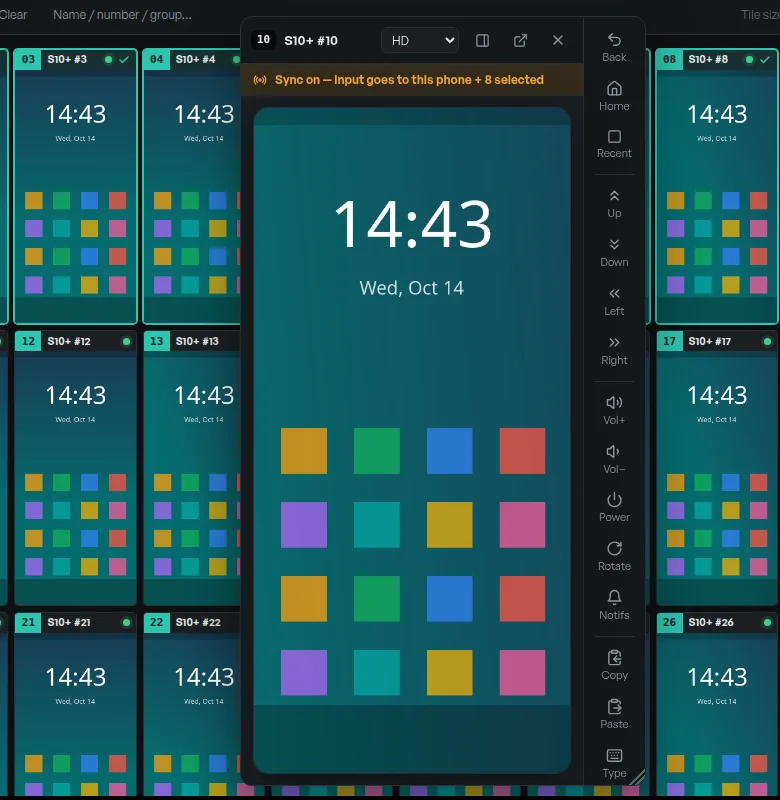
Double-click any phone to open it large, with a full control bar: back, home, recents, swipes, volume, power, rotate, notifications and clipboard. Turn on Sync and every selected phone follows along.
PhoneFarm uses WebUSB, the browser’s built-in USB support, to speak ADB to your phones directly. No drivers on macOS, no software to install or keep updated.
Connect your phone farm box with its USB cable in USB mode. Close other phone tools, or run adb kill-server.
Click “Add USB phones” and pick the phones once. Screenless boards connect with the built-in box key.
Select phones, switch on Sync and work. Want no cables? Prepare the boards and switch to OTG or Wi-Fi.
| PhoneFarm | Typical group-control software | |
|---|---|---|
| Price | Free, unlimited phones | Limited free tier, then paid per device or per month |
| Install | None: open a web page | Windows installer, drivers, updates |
| Mac & Linux | Yes | Usually Windows only |
| Account & activation | None | Registration, licence keys, VIP tiers |
| Your data | Stays in your browser | Often tied to a vendor account |
| Connection | USB, Ethernet (OTG/LAN) and Wi-Fi | USB, often also Wi-Fi / OTG |
Yes. PhoneFarm is free to use with no account, no trial and no device limit. It is a static website: your browser does all the work, so there is no server cost per phone to pass on to you.
No. Open PhoneFarm in Chrome or Edge and connect your phones. The browser talks to the phones directly. Nothing is installed on your computer, and nothing is installed permanently on the phones: small helpers are copied to each phone’s temporary folder while you use it and stop when it reboots.
Chrome, Edge and other Chromium-based browsers on Windows, macOS, Linux and ChromeOS. Browsers without WebUSB support cannot connect to phones, and phones and tablets cannot be used as the controlling computer.
Yes. Connect the boards over USB once after each boot and click Prepare boards in Network mode. PhoneFarm starts a small helper on each board. After that you can switch the box to OTG/LAN mode (Ethernet) or keep the boards on Wi-Fi, unplug the USB cable and click Find boards on my network. Your computer must be on the same network, and Chrome asks once to allow access to local devices.
There is no limit in PhoneFarm. Over USB, the limit is your computer’s USB controller and hubs: a modern laptop handles a 20-phone box easily. Network mode avoids USB limits entirely, so 40, 80 or more boards on a wired router work well. Lower the small-screen quality for very large farms.
Yes. Boards without a screen cannot show the “Allow USB debugging” prompt. PhoneFarm includes the standard key that common farm boxes are pre-authorized with, so most boxes connect with no setup. If your box uses its own key, import its adbkey file once under ADB key & access.
No. Screens, files, APKs, commands and text go straight from your browser tab to your phones over USB or your local network. Device names, groups and recorded actions are saved in your browser only. Use Settings → Export backup to move them to another computer. The site only counts visits (page, country and device type) to see how it is used.
Not on the same USB phones. A USB phone can only be used by one program at a time. Quit other phone tools or run “adb kill-server” before connecting, then PhoneFarm can claim the phones.
Android 5.0 and newer with USB debugging enabled. Phone farm boxes ship with debugging already on.
Free, private and ready now. Try the demo first if your box isn’t plugged in yet.